Tools And Products
A list of all the tools, products and services to help you remain private.
THE LIST

AI Tools
Second item
Third item
How To Protect Your Real Email Address
Second item
Third item
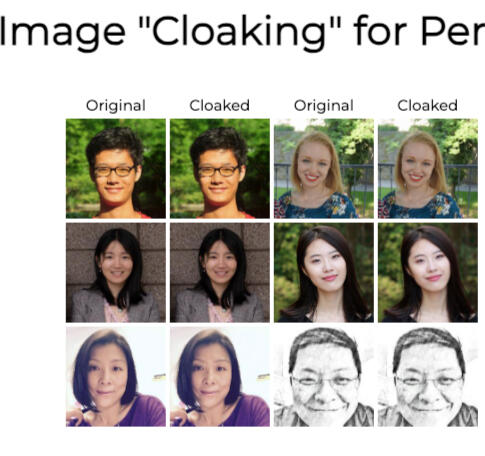
"Fawkes": A Clever Cloak For Your Digital IdentityIf you're concerned about facial recognition invading your privacy, Fawkes might be the digital armor you've been waiting for. Developed by researchers at the University of Chicago’s SAND Lab, Fawkes is a free tool that subtly alters your photos to confuse facial recognition systems—without visibly changing your selfies.🔍 What It Does
Fawkes uses AI to apply imperceptible changes to your images, a process called “cloaking.” These tweaks trick facial recognition algorithms into misidentifying you, effectively corrupting the databases that companies like Clearview AI rely on to identify people.✅ Pros
- Effective Protection: Tests show Fawkes is 100% successful against major facial recognition services like Microsoft Azure Face, Amazon Rekognition, and Face++.
- User-Friendly: Though minimalist in design, it’s easy to use and processes images in just a few minutes.
- Free and Accessible: Available for Windows and Mac, with over 100,000 downloads already.⚠️ Cons
- Limited Adoption: For Fawkes to truly disrupt facial recognition, widespread use is essential. Right now, it's mostly tech-savvy users who benefit.
- No Mobile or Web App: Due to security concerns, the team has no plans to release mobile or web versions.
- Retroactive Limitations: It can't protect photos already scraped and stored by facial recognition firms.Final Thoughts
Fawkes is a powerful tool for those serious about digital privacy. While it’s not a silver bullet, it’s a meaningful step toward reclaiming control over your online identity. If platforms like Facebook were to integrate similar cloaking tech, it could reshape the future of facial recognition entirely.---
Here's The LinkThis is an informative write-up. Please do your own due diligence.
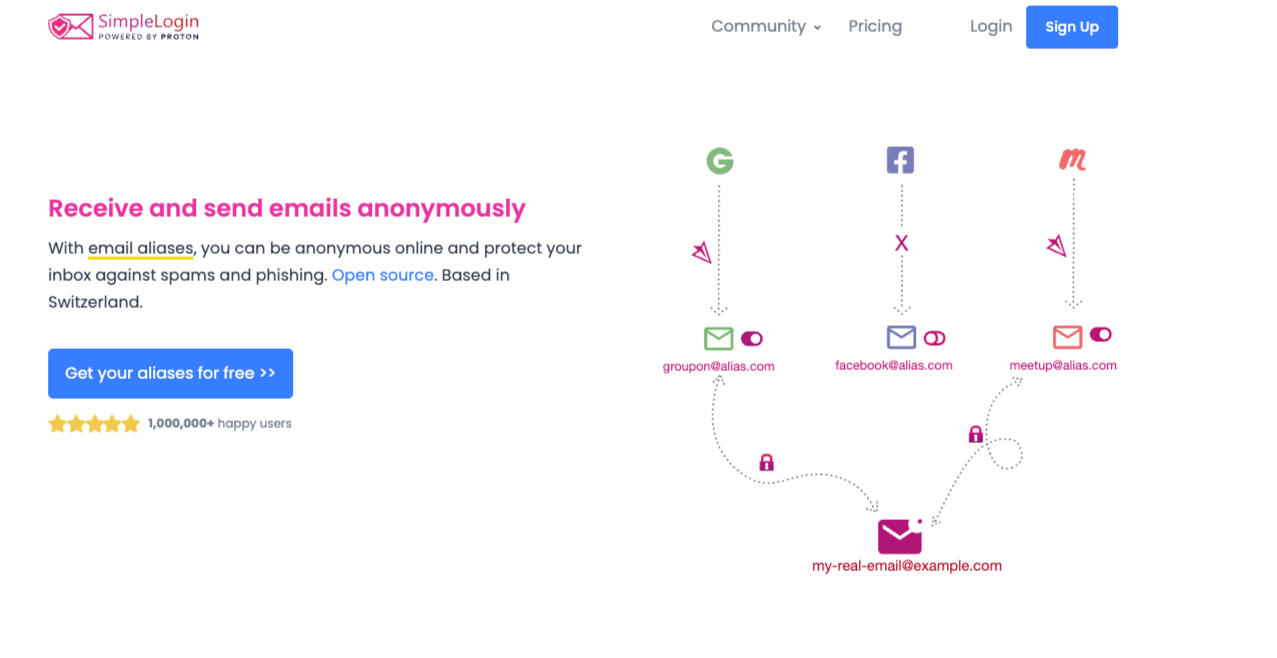
"SimpleLogin": Privacy tool For EmailsIt is a privacy tool designed to protect your real email address by generating aliases—temporary email addresses you can use instead of your personal inbox when signing up for services or newsletters.Here’s a balanced review based on user feedback and tech expert analysis.Key Features
- Email aliasing: Generate unlimited aliases (premium), or up to 10 on the free plan, to keep your real address hidden from spammers and data breaches.
- Forwarding & Replies: Emails sent to an alias are forwarded to your actual inbox, and you can reply without revealing your real address.
- Integration: Works with major inboxes (Gmail, Outlook), and is natively integrated into Proton Pass for a seamless privacy experience.
- Open Source: Code is available on GitHub, which boosts transparency and community trust.
- Security: Offers two-factor authentication (including hardware keys), PGP encryption for premium users, and handles email with strong privacy policies under EU and Swiss law.Platforms & Usability
- Dashboard: The main web dashboard is powerful but sometimes described as dense or less intuitive for beginners.
- Browser Extensions: Available for Chrome, Firefox, and others—though users mention occasional sluggishness or minor bugs.
- Mobile Apps: Simple, reliable apps for iOS and Android allow easy management on the go, and are also on F-Droid (Android open-source store).
- User Experience: Generally praised for reliability and peace of mind, but the learning curve and 10-alias limit on the free tier are minor drawbacks.Privacy & Security
- End-to-End Encryption: Premium users can use PGP so that only you can read forwarded email content.
- Minimal Data Retention: No logs are kept long-term. Emails are processed in memory and deleted after relaying, and IP logs are purged after a week (unless abuse occurs).
- Jurisdiction: Operates under stringent French and Swiss privacy laws (now part of Proton AG), and privacy policy is GDPR-compliant.Pricing
There's a Free Plan and a - Premium one, too.Common Praise
- Lets you regain control of your digital identity and block spam easily.
- Transparent open-source approach builds trust.
- Keeps aliases active even after a subscription ends.Common Criticisms
- The web interface is dense and may intimidate new users.
- 10-alias free tier is considered limiting for heavy users.
- Minor bugs or lag in extensions occasionally reported.Who Should Use It?
SimpleLogin is ideal for privacy-conscious users who want to shield their main email from spam, leaks, or aggressive marketers. It's also great for anyone managing multiple signups or worried about email-based tracking. For best privacy, pair with a privacy-focused mail provider like Proton Mail.Final Verdict
SimpleLogin stands out for its strong privacy features, open-source transparency, and integration with big players like Proton. It isn’t a full email provider—just a privacy shield for your inbox. While there’s a short adjustment period, it gives you back some peace of mind with every alias you create.Here's The LinkThis is an informative write-up. Please do your own due diligence.
Arcu tempus
Bibendum ut tristique et egestas. Nibh tortor aliquet lectus etiam. Porta nibh venenatis cras sed felis lorem ipsum dolor consequat.
Mattis aliquam
Lorem ipsum dolor sit amet, etiam lorem sed et adipiscing elit cras turpis veroeros.
Want your privacy tool, product or service featured in our directory? Free: Just a few lines. Paid: For a small fee, get an entire product description listed. Message us for the listing rate!